The Myth of the Perfectly Empty Inbox
A perfectly empty inbox is a poor measure of progress. Separate action emails from reference and waiting messages to clarify decisions and make replies easier.
The common mistake is treating an empty inbox as proof that important work is done. Chasing inbox zero can cost you attention: messages disappear from view while the decisions and obligations inside them remain unresolved. A useful inbox is not necessarily empty; it makes the next action clear.
Email mixes requests, reminders, receipts and records in one stream. Clearing that stream may feel tidy, but tidiness is not progress. The better question is what each message asks of you, what you have decided and what the sender needs next.
Why does the inbox refill after you clear it?
Most messages arrive on someone else’s schedule. You can finish a batch and still receive a meeting update, a colleague’s question or an automated receipt before lunch. Treating zero as a lasting condition turns ordinary arrivals into evidence of failure.
The practical cost is repeated sorting. If you reopen a thread because it still looks unfinished, or move messages between folders without deciding what they mean, you spend attention on appearances. An inbox is like a letter tray: removing every sheet matters less than knowing which envelope needs a reply and which is a record.
Change the target from “nothing here” to “I can explain why each message is here”. A message can remain visible while you await information, provided its status is clear in the thread or through a label. That is less photogenic than zero, but more useful.
How can you make an email’s status clear?
Start with the message, not a new filing system. If a reply will move the conversation forward, answer with a clear acknowledgement, decision or question. If you need time to consider a request, tell the sender what you will do next and when they can expect a response.
When someone else must act first, say so in the thread: “I’m waiting for the revised file before I can approve this.” If a follow-up date matters, add it to your task list or use a flag whose meaning is obvious to you. The message then records the dependency rather than posing as an unanswered request.
Archive reference messages such as booking confirmations or documents sent for information; unread status does not create a duty to reply. Use a folder name you would actually search for, such as “Facilities” or “Project Alder”. Follow your organisation’s retention rules for formal records.
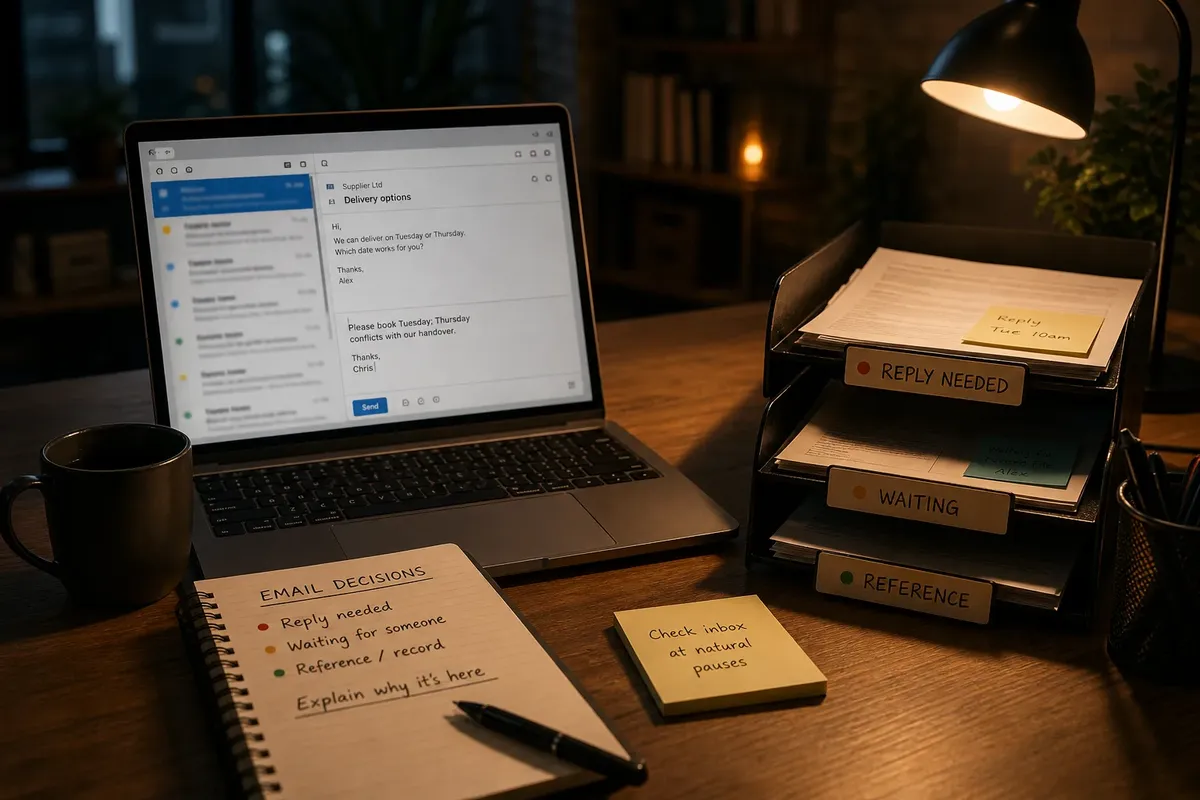
A small set of labels can help if your mail system makes them easy to see. “Reply needed”, “Waiting” and “Reference” describe distinct states. A dozen near-duplicate labels mostly describe the person who made them.
Which message should you answer, flag or file?
Use the message’s purpose and the sender’s need to choose an action. Each check below links an observation to a decision and an alternative.
- Direct question: If you can answer accurately now, reply and archive the thread if nothing remains; if you need information or time, acknowledge the request and state what you need or when you will respond.
- Decision required: If the message contains enough information to decide, reply with your choice; if comparison or discussion is needed, flag the thread and tell the sender when you expect to respond.
- Someone else must act first: If their action blocks yours, name the missing item in a reply and mark the thread as waiting; if no one owns a next action, archive it as reference instead.
- Receipt or copy only: If you may need the message later, archive it in a relevant folder; if it has no continuing use and no retention requirement, delete it.
- Possible courtesy reply: If a short response would resolve uncertainty, send it; if it would only add “thanks” to a complete conversation, leave the thread alone.
- Deadline or time-sensitive change: If the timing affects your work, respond or set a clear follow-up point; if it does not, process the message with the rest rather than letting its arrival dictate the day.
What does a worked email decision look like?
Say you receive a supplier email asking you to choose between Tuesday and Thursday for a delivery, plus a separate confirmation for an earlier order. The dates and circumstances here are invented for illustration, not real commitments.
- Read the request: The first email offers Tuesday or Thursday and asks for a choice. A decision and reply are needed, not just filing.
- Check the schedule: Suppose an invented team schedule shows Tuesday is suitable and Thursday conflicts with a planned handover. Choose Tuesday; if neither date worked, ask the supplier for another option.
- Reply in the thread: Write, “Please book Tuesday; Thursday conflicts with our handover.” The supplier can see the choice and its reason.
- Handle the confirmation: The separate email confirms the earlier order and requests no action. Archive it under the supplier’s name; if a formal retention rule applies, follow it instead.
- Check the result: The delivery thread now contains your decision, while the old confirmation is retrievable without sitting among unanswered requests.
The point is not that every email needs a carefully composed reply. A message should not be left to imply a promise you never made. One clear sentence can save both sender and recipient from guessing.
How can you stop email interrupting focused work?
Frequent checking can make even a well-sorted inbox feel like the centre of the day. New mail supplies a stream of small decisions, each capable of displacing the task you had chosen. An inbox left open invites attention, though some roles genuinely require timely replies.
Close the inbox during work that needs concentration, then check it at points that fit your role. If you must be reachable, keep alerts for specific people or channels that need a prompt response rather than letting every message make the same claim. Agreeing expectations with colleagues can help; an email notification is not, by itself, a fire alarm.
Imagine you are drafting a report while colleagues send routine updates and a project lead may need to contact you about an urgent change. You silence general email alerts, keep the agreed urgent channel available and review the inbox at a natural pause. The expected result is that routine messages no longer interrupt the draft while the urgent route remains open. If your role requires immediate email responses, use a shorter checking rhythm instead of switching alerts off entirely.
How do you know the inbox is under control?
Scan the open conversations and ask whether you can say what each sender needs next. If you cannot, clarify the thread before adding more folders or chasing zero. A sensible inbox lets you distinguish messages requiring a response from those waiting on someone else and those kept as records.
The inbox is under control when its visible messages have a clear purpose, even if some remain there. The main search phrase, managing an email inbox, is useful here: judge the system by whether it helps you act or retrieve a message, not by whether the screen looks immaculate.